.png?width=210&height=44&name=Design%20ohne%20Titel%20(2).png)
In absence.io, each absence type (e.g. vacation, sick leave, home office) can be customized with various settings. Below is a clear overview of all available toggle options – including explanations and practical examples.
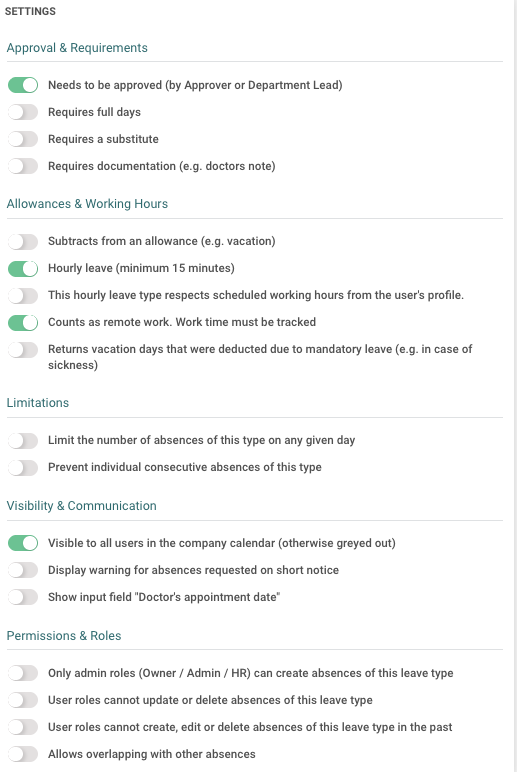
✅ Approval & Requirements
| Option | Description | Example |
|---|---|---|
| Needs to be approved (by Approver or Department Lead) | The absence must be approved by a responsible person (e.g. manager). | Vacation must be approved by the team lead. |
| Requires full days | Only full-day absences are allowed. | Half-day requests are not possible. |
| Requires a substitute | The employee must name a substitute when requesting. | Useful for long absences or critical roles. |
| Requires documentation (e.g. doctors note) | A document (e.g. doctor’s note) must be uploaded. | For sick leave with mandatory medical proof. |
📅 Allowances & Working Hours
| Option | Description | Example |
|---|---|---|
| Subtracts from an allowance (e.g. vacation) | The absence reduces a specific quota. | Vacation reduces the vacation balance. |
| Hourly leave (min. 15 minutes) | Absence can be logged in smaller time units. | Ideal for medical appointments. |
| Counts as remote work. Work time must be tracked | Info in the Calendar. The absence is treated as working time and must be tracked via time tracking. | Home office day, must be clocked in. |
| Returns vacation days that were deducted due to mandatory leave (e.g. in case of sickness) | Vacation is returned if a mandatory leave overlaps with sick leave. | Employee gets vacation days back due to illness during mandatory leave. |
⛔ Restrictions
| Option | Description | Example |
|---|---|---|
| Limit the number of absences of this type on any given day | Only X absences of this type allowed per day. | Max. 1 employee on vacation per day in a team. |
| Prevent individual consecutive absences of this type | This type cannot be requested for multiple consecutive days. | Prevents, for example, individually entered sick days from being scheduled consecutively. |
👀 Visibility & Communication
| Option | Description | Example |
|---|---|---|
| Visible to all users in the company calendar (otherwise greyed out) | The absence will appear in the shared calendar. | Vacation is visible to team members. |
| Display warning for absences requested on short notice | Displays a warning if the absence is submitted with little lead time. | Vacation requested the day before. |
| Show input field "Doctor's appointment date | Adds a specific input field in the request form. | Useful for tracking doctor-related absences. |
👤 Permissions & Roles
| Option | Description | Example |
|---|---|---|
| Only admin roles (Owner / Admin / HR) can create absences of this leave type | Only Admins, Owners, or HR can create this absence type. | Only HR can create a “Special Leave” type. |
| User roles cannot update or delete absences of this leave type | Users cannot change or delete this type. | Leave types cannot be modified accidentally. |
| User roles cannot create, edit or delete absences of this leave type in the past | Absence of this type cannot be added for past dates. | User wants to log a home office day retroactively – not permitted. |
| Allows overlapping with other absences | Employees can log this type parallel to another. IMPORTANT! Absence types linked to a allowance do not allow overlaps. This function must be activated by Support. | A training day and remote work logged on the same day. |
📌 Note:
These settings are managed per absence type and help you structure approval processes, visibility, and automation according to your organization’s needs.
Enjoy customizing your absence types!
Your team at absence.io 💙