.png?width=210&height=44&name=Design%20ohne%20Titel%20(2).png)
With the creation of departments and teams, you can structure your company, make it clearer to the users and simplify the approval process.
Difference between departments and teams:
- A user can be assigned to only one department. The members of the department can see each other in the team calendar and can notify each other in case of absences.
- If employees, however, should see each other without any limitation, you can assign them to a common team. A user can be member of several teams. Thus, the creation of teams expands the view of other users.
- Users with the HR, Admin, and/or Owner role can always see all users in the team calendar. They are therefore exempt from the rules described above.
Departments
Under "Settings" > "Departments", you can create new departments by clicking the blue button in the top right corner. Give the department a name and then add all employees who belong to it. You can find more detailed information about this step here.
Please note: A user can only be assigned to one department at a time.
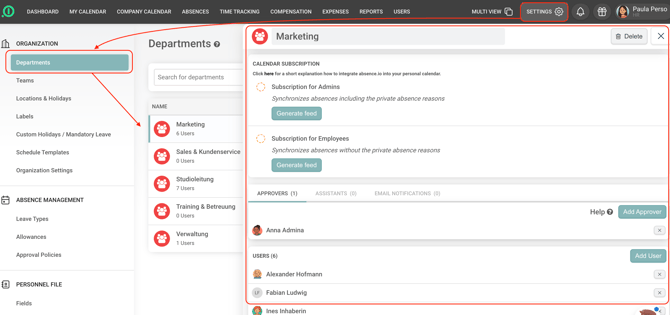
You can assign one or more approvers to a department who are responsible for approving absence requests.
Please note:
- If no approver is assigned to the department, absence requests will automatically be sent to the approver assigned in the individual user's profile.
- If neither the department nor the individual user has an assigned approver, absence.io will automatically assign an available approver from the organization. This is why all available approvers are shown as selectable options.
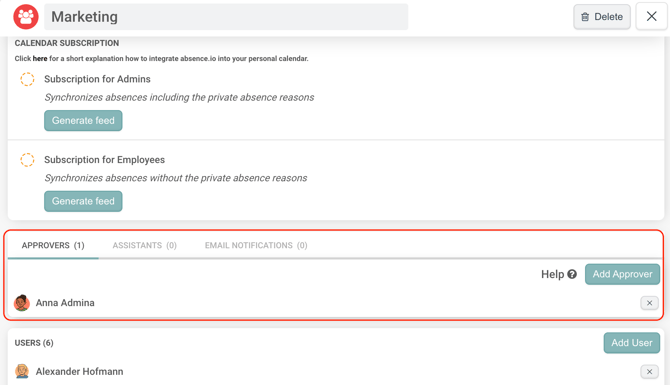
You can also assign assistants to a department who are allowed to create absences on behalf of users in that department. To enable email notifications, simply select a specific user or enter an email address.


Teams
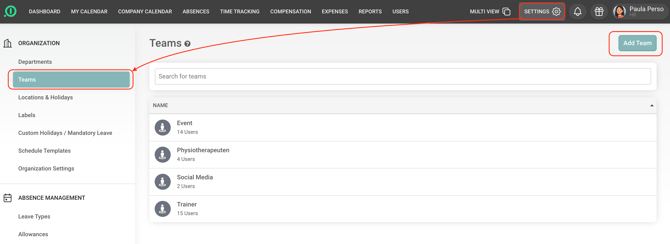
By creating teams, you can extend users' visibility in the team calendar. This allows users to see colleagues across different departments. You can find detailed information on how to create a team here.
Your absence.io team